>
>
Before Your GTM Container Size Reaches 100%: The Architecture That Will End the Custom HTML Crisis
We Shared a Few Tips for You to Use Your GTM Container More Optimally

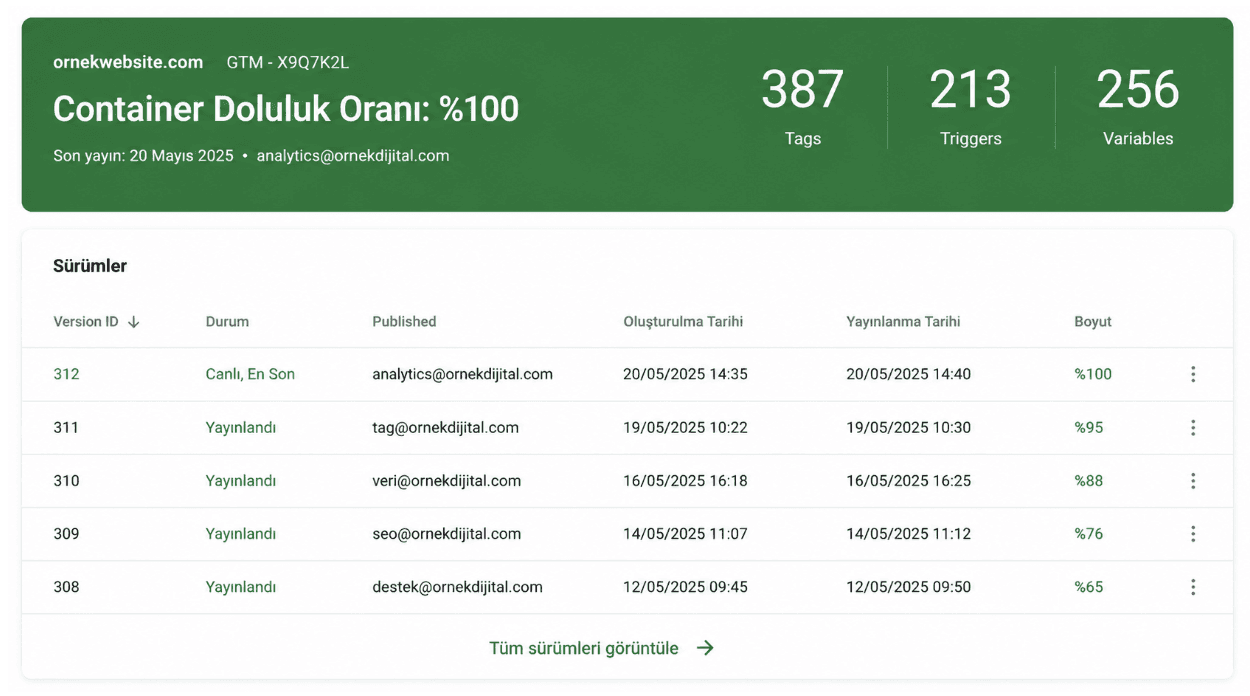
Google Tag Manager (GTM) gives marketing and analytics teams great freedom in tag management. When standard tag types are not enough, Custom HTML tags come into play, representing the widest area of this freedom. However, behind this freedom lies a limit that most teams realize too late: each GTM container is limited to 200 KB.
In this article, we will discuss in which situations Custom HTML tags are used, why the container fills up, and what architectural measures can be taken before it gets full. Then, we will explain step-by-step a solution approach that can be implemented by teams stuck at this limit with zero cost.
Why Are Custom HTML Tags Used So Frequently?
GTM's standard tag types meet most of the daily usage. However, in some scenarios, standard tags are insufficient, and teams have to write HTML and JavaScript directly.
The most common situations are:
Structural data (Schema markup) injection
Structural data in JSON-LD format such as products, articles, frequently asked questions, and breadcrumbs are printed directly onto the page as HTML. It is preferred to go live quickly without waiting for the development cycle.
Third-party pixel and script integrations
Pixels of advertising platforms that receive special parameters, launch scripts of A/B testing tools, chat widgets, and heat map tools are mostly added as Custom HTML.
In-page variable calculation and dataLayer manipulation
Custom code is required to calculate data points that cannot be accessed with standard variable types, dynamically push them to the dataLayer, or collect data from page elements.
DOM manipulations and user interface events
Operations such as adding an element to the page when a specific button is clicked, managing the cookie banner, or dynamically assigning values to form fields are done through Custom HTML.
Conversion and event helper scripts
For a conversion to truly be measured, some helper functions may need to run on the page. These functions are written and triggered inside Custom HTML.
In each of the above scenarios, Custom HTML offering a solution is a strong justification. However, there is another strong dynamic here: adding Custom HTML does not require developer approval, deploy processes, or technical coordination.
A marketing manager identifies the need in the morning and takes the tag live in the afternoon. This speed is a great advantage. But precisely because of this speed, Custom HTML tags accumulate over time.
The Container Limit Fills Up Silently
GTM's 200 KB limit does not fill up overnight. It accumulates over the years.
One day, the team wants to add a tag for a new campaign, and the GTM container gives a 100% warning. All old tags are running live, and although none of them seem critical on their own, as a whole they carry the business processes. They cannot be deleted, but a new one cannot be added either.
At this point, two wrong reflexes are usually observed:
Examining old tags one by one and questioning which one is truly necessary
Postponing the problem and looking for temporary solutions
However, the real problem is not the number of tags, but how GTM is used.
The Right Question: What Should GTM Host?
GTM's design purpose is to manage and trigger tags. It is not to host content.
Long JSON-LD blocks, extensive JavaScript functions, and kilobytes of content written inside Custom HTML tags are not actually GTM's job.
A healthy approach is to use GTM only as a router. The content stays somewhere else, and GTM triggers the loading of that content.
Making this distinction saves the container from filling up for years.
Architectural Solution: Calling the JavaScript File from GTM
The essence of the solution is this:
All the long code written inside the Custom HTML tag is moved to an external JavaScript file. The tag in GTM, on the other hand, contains only a single line; which is the script tag calling the external file.
In other words, the content of the Custom HTML tag in GTM becomes as short as this:
<script src="https://my-external-file.com/scripts/tracking.js"></script> |
Inside the external file, all desired logic runs. Different codes can be triggered according to the page URL, content can be dynamically calculated, and different behaviors can be executed based on various conditions.
GTM is not aware of any of this logic; it just calls the file.
The advantages brought by this approach are not limited only to solving the container size problem:
Code updates are done without GTM
When a change is needed, there is no need to enter GTM and publish. The external file is updated, and GTM remains as it is.
Multiple GTM containers can be fed from a single file
If the same code runs on multiple sites, the same script call is added to each container. The code is managed from a single place.
Closer to developer workflow
The code can now be managed in an editor, with syntax highlighting, and a pull request process. It gets out of the narrow text area of GTM.
Where Should the External File Be Hosted?
To apply this approach, a hosting solution is required.
If there is access to the site's own server, the cleanest method is to put the file directly there. However, marketing and analytics teams mostly do not have server access.
In this case, several reliable zero-cost options come into play:
Git-based code hosting services
Platforms like GitHub and GitLab host the code and provide version control. Files in the repository are not served directly from the internet, but they serve as the basic source for the hosting services to be connected.
Static hosting platforms
Platforms like Render, Netlify, Cloudflare Pages, and Vercel connect to the git repository and automatically deploy every commit.
This way, as soon as the code is pushed to GitHub, the new version is taken live. Their free plans are usually sufficient for this kind of lightweight usage.
The ideal flow is as follows:
The code resides in a version control platform like GitHub
This repository is connected to a static hosting service like Render
Every commit made to the repository is automatically deployed
GTM calls the fixed URL provided by this hosting service
As long as the hosting URL does not change, there is no need to touch GTM again.
The Operational Side: Content Management
The architectural change solves the problem on the technical side, but the daily workflow of the team producing the content must also be considered.
It is not desirable for the SEO or marketing team to have to edit code to add a new structural data or a new tracking code.
At this point, a management interface can be built on top of the external file.
The interface allows users with no coding knowledge to add data via a form, view existing records, edit, and delete them.
The management interface can also be hosted on the same hosting platform; teams simply open a URL and fill out the form to get things done.
This way, the system is divided into three layers:
The user uses the management interface
The interface writes the code to the git platform
The hosting service automatically deploys it
This entire process takes only a few seconds.
Thinking Before Hitting the Limit
Custom HTML tags are one of the most powerful features of GTM, but they are also one of the biggest factors increasing GTM's size.
Each added tag reduces the container size by a certain amount. This is invisible at first, but for teams producing content quickly, hitting the limit is inevitable one day.
When that day comes, instead of looking for temporary workarounds, setting up the architecture correctly from the very beginning requires much less effort.
Viewing GTM as a router; leaving the content to external files, files to the git platform, deployment to static hosting services; and building a management interface on top of these for daily team use...
These four steps allow a team to grow without experiencing GTM container issues for years.
The important thing is not to wait for the container size to give a warning; it is to establish the structure correctly before that warning comes.
A correctly established system does not only solve today's problem; it does not tire the team tomorrow when more content is produced, more tracking is added, and more complex campaigns are run.